

|
LatencyMon
Target audience | |||||||
|
 Novice users
 Power users
Latest version: LatencyMon v 7.40
LatencyMon checks whether a system running Windows is suitable for
processing real-time audio and other time-sensitive tasks. It analyzes
potential causes of audio buffer underruns by measuring kernel timer
latencies and monitoring DPC and ISR execution times, as well as hard
pagefaults. LatencyMon helps identify the kernel modules and processes
responsible for excessive latencies that may result in audio dropouts.
It also provides dedicated ISR, DPC, and hard pagefault monitoring
functionality.
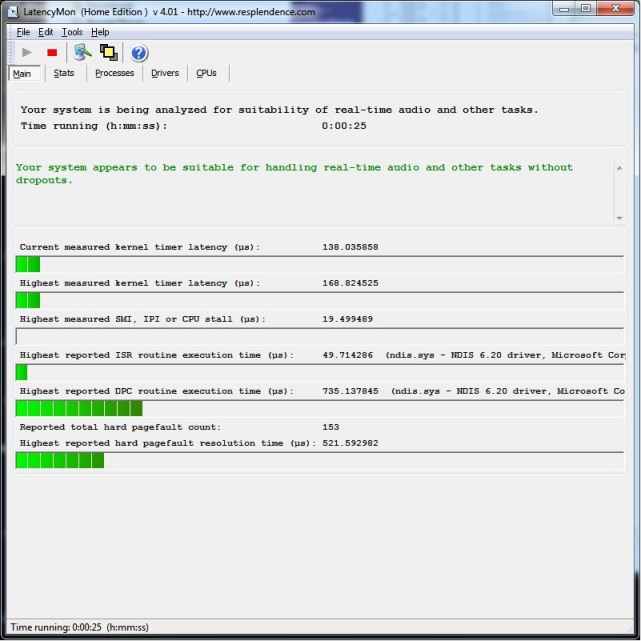
LatencyMon displays the highest measured kernel timer latencies, the
longest ISR and DPC execution times, and detailed hard pagefault
statistics. In most cases, it can identify the drivers and processes
responsible for these events. It generates a comprehensive,
easy to understand report and presents detailed measurement data,
allowing users to perform in-depth latency analysis.
The audio latency problem
Windows is not a real-time operating system. Requests to the operating
system are generally handled on a best effort basis, without guarantees
that they will be processed within a specified time frame. Such timing
guarantees are a defining characteristic of realtime operating systems.
While this is not a problem for most applications and tasks, it can be
problematic for realtime audio applications, which are considered soft
realtime systems. These applications must continuously deliver audio
data to the subsystem and hardware in buffers at regular intervals. If
one or more buffers are not processed or delivered before their
deadlines, audible artifacts such as dropouts, clicks, and pops may
occur.
About DPCs and ISRs
The Windows thread dispatcher (also known as the scheduler), which is
part of the kernel, schedules threads according to a priority based
scheme. Higher priority threads are generally given preference over
lower-priority threads when competing for processor time. The duration
for which a thread is allowed to execute before being subject to
time slice expiration is known as its quantum or time slice.
However, the Windows kernel also handles other types of execution,
including interrupt service routines (ISRs) and Deferred Procedure Calls
(DPCs). Hardware devices can generate interrupts that cause their
associated ISRs to execute on a processor. An interrupt may occur on the
same processor on which an audio application thread is running. When
this happens, the executing thread is temporarily interrupted,
regardless of its priority.
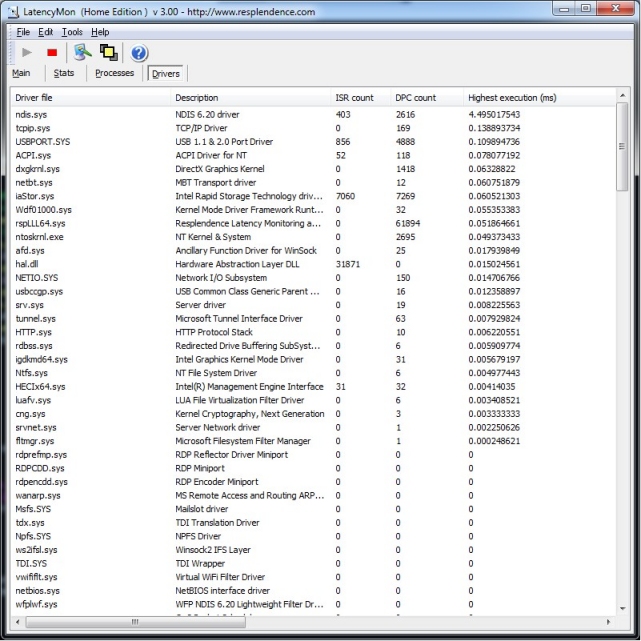
An ISR handles the interrupt and may schedule a DPC to perform
additional processing. The DPC typically executes on the same processor,
potentially delaying the resumption of the interrupted audio thread.
ISRs and DPCs execute at elevated interrupt request levels (IRQLs),
which means they cannot be preempted by ordinary thread scheduling.
Consequently, even high-priority audio threads may be prevented from
executing until the relevant interrupt and DPC processing has completed.
To maintain system responsiveness and minimize scheduling delays, ISR
and DPC routines should complete their work as quickly as possible.
General guidelines recommend keeping execution times below approximately
100 µs. However, these targets are not always achievable, particularly
when hardware behavior introduces delays beyond the driver's control.
If ISR or DPC execution times become excessive, audio processing threads
may be delayed long enough to miss their deadlines, preventing audio
buffers from being processed or delivered in time and potentially
causing audible dropouts, clicks, or pops.
About hard pagefaults
Windows uses a virtual memory system that relies on the memory
management and address translation capabilities provided by the CPU.
When a program accesses a virtual memory address whose page is not
currently mapped to physical memory, the processor generates a page
fault exception (INT 14 on x86 and x64 processors). The Windows page
fault handler then determines how to resolve the fault.
If the requested page is valid but not resident in physical memory,
Windows may need to retrieve it from secondary storage, such as the
paging file or a memory mapped file. This is known as a hard pagefault
and can take a significant amount of time to resolve. If the required
data is already available in the system's storage cache, the delay may
be relatively small. However, if the data must be physically read from a
storage device, the operation can introduce substantial latency.
If an audio application encounters a hard pagefault during real-time
audio processing, the resulting delay may prevent it from meeting its
processing deadlines. This can lead to audible artifacts such as
dropouts, clicks, or pops.
LatencyMon documentation and articles
Copyright © 1997-2026 Resplendence Software Projects, a trademark of SoftRev Labs S.r.l.s. All rights reserved. Privacy Policy.
Page generated on 2026-10-28 12:45:23 AM. Last updated on 2026-10-23 11:15:11 AM.