

|
Overview of features
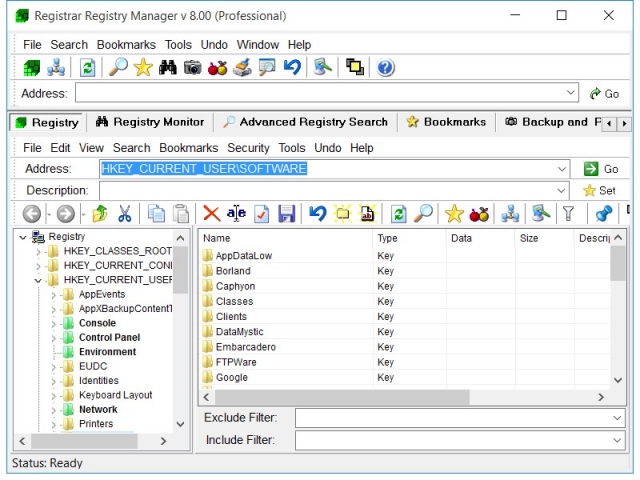
Advanced registry manager with explorer style interface
Registrar Registry Manager provides a common and user friendly interface which allows you
to quickly find the keys and values you are looking for.
The interface is similar to Windows Explorer. You can use the navigation buttons to browse
through the registry. You can use drag & drop or the clipboard to copy and move registry keys.
The address bar makes it easy to immediately access the registry key of your choice.
The description bar will allow you to add notes to keys and values.
Advanced registry search and replace functionality
Registrar offers blazing fast registry searches on both local and remote registries. Text, binary and regular expression searches are supported. Filters allow you to specify registry data size, value type and last write time ranges. From the view which reports matches you can easily rename, replace, delete or export found items.

Registry backup and restore
Registrar offers secure registry backup and restore, allowing you to recover from any registry disaster situation. Registry backups on disks can always be modified offline using the registry file editor.

Registry bookmarks
Bookmark often visited registry keys so they can be quickly accessed. Registrar
offers a registry bookmark editor with categories and optional key coloring.
Remote Registry Editing
Open up as many remote registry windows as you need.
Registry File Editing
Open registry files in separate editing windows and edit them as if it were your local registry.
Repair broken system configurations
The registry file editor can be used to open registry files creating the backing of the registry of a system. If a system is unbootable due to
errors in the registry, you can use the registry file editor to edit the offline registry hive files and repair the system. This feature has
been a life saver in many situations.
Registry Monitor
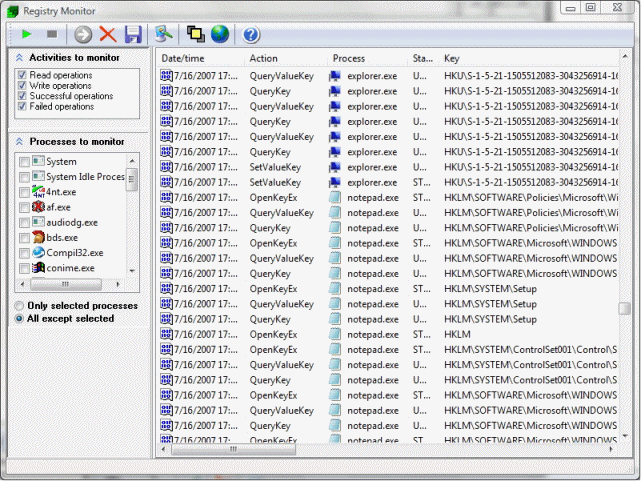
Monitor registry activity by the system and running applications. You can filter on activity and process name. After stopping the monitor
you can use non-destructive include and exclude filters to apply a search on logged items.
Registry Key Properties
Get detailed information on registry keys including stats and security settings.
Advanced data editor
Registrar offers a registry data editor for every type of registry value.
Multi-level undo
Registrar supports multi-level undo. You can undo any changes made to the registry by using the undo feature. Simply press CTRL-Z tro undo the latest action or select any previous action
from the list that Registrar maintains.
Advanced Registry Compare
Compare two registry keys with each other in detail. You can compare local registry, remote registries and registry files. Matching and missing items and
differences in registry data will be reported in detail.
File Reference Editor
Serach for references to files in your registry.
CLSID Lookup Utility
The CLSID lookup utility allows you to find COM objects in your registry quickly and see
what are their names, in-process servers and responsible companies and products. If you are browsing a registry key
related to a CLSID, an automatic description will be generated.
Search for hidden keys
Search your registry for hidden keys that contain embedded NULL characters in their key or value name.
Many options and a highly customizable interface
Registrar offers a long list of options which allow you to fine tune the behavior of the software. The user interface can be tweaked
and the software supports different layout schemes including a tabbed docking interface.
Command line edition included
Registrar comes with a separate, full-featured command line edition which allows you to schedule registry batch job
on your network. The command line edition offers all the functionality of the GUI version.
For a detailed overview of all features that Registrar supports, check out the feature comparison chart.




Note: this content is currently being updated.
Registrar Registry Manager documentation and articles
Copyright © 1997-2026 Resplendence Software Projects, a trademark of SoftRev Labs S.r.l.s. All rights reserved. Privacy Policy.
Page generated on 2026-06-11 04:37:02 PM. Last updated on 2019-12-20 03:32:50 PM.